> For the complete documentation index, see [llms.txt](https://docs.nexusglobalpayments.org/llms.txt). Markdown versions of documentation pages are available by appending `.md` to page URLs; this page is available as [Markdown](https://docs.nexusglobalpayments.org/payment-setup/step-12-ask-the-sender-for-approval.md).
# Step 12: Ask the Sender for approval
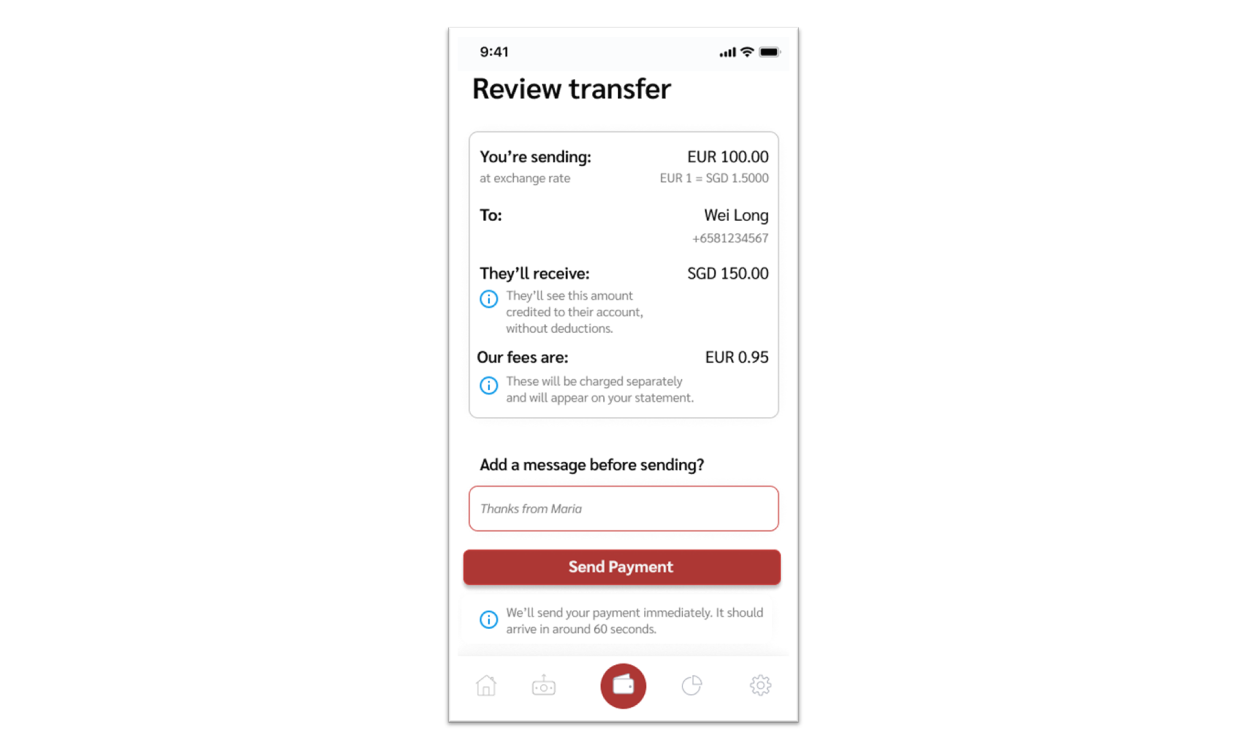
### Step 12: Ask Sender to review and confirm details
**The Source PSP should now ask the Sender to review all details before confirming the payment.**
The Nexus scheme has specific requirements on the minimum information that should be shown to the Sender, to ensure transparency around the costs and FX rates that will be applied to the payment. The Source PSP should display:
* The **Source Currency Amount** – the amount that will be deducted from the Sender’s account
* The **Destination Currency Amount** – the exact amount that will be credited to the Recipient’s amount
* The **exchange rate** that will be applied. This is the effective exchange rate paid by the Sender - the ratio between the amount deducted from the Sender's account, and the amount that is ultimately credited to the Recipient's account (rather than the exchange rate paid by the Source PSP to the FXP). See [Fees](/payment-processing/fees.md#toc163731038)
* The **fees** that the Sender will be charged by the Source PSP.
See [Fees](/payment-processing/fees.md#toc163731038) for further details.
### Sender's payment reference
The PSP can also offer the Sender a field to add a message/reference to the payment, which will be visible to the recipient. This message can be stored in the `pacs.008` element `/Document/FIToFICstmrCdtTrf/CdtTrfTxInf/RmtInf/Strd/CdtrRefInf/Ref` . (The message field can alternatively be added at any other point in the flow.)
The Sender will be able to review all the key details before confirming the payment